Leaderboard




Popular Content
Showing content with the highest reputation since 09/09/2025 in Posts
-
EScribe Suite 2.0 SP69 For US-based customers (Windows): https://downloads.evolvapor.com/SetupEScribe2_SP69_US_ServicePack.exe For US-based customers (Mac): https://downloads.evolvapor.com/SetupEScribe2_SP69_US.pkg For international customers (Windows): https://downloads.evolvapor.com/SetupEScribe2_SP69_INT_ServicePack.exe For international customers (Mac): https://downloads.evolvapor.com/SetupEScribe2_SP69_INT.pkg If you would like the Oxva-specific version, https://downloads.evolvapor.com/SetupEScribe2_SP69_OXVA.exe For customers using Linux, see the beta thread. --- Oxva Pro 2 DNA --- This version may reduce the frequency of Fill Pod errors when using Replay, when Replay is set on the first puff after connection. This version also adds puff trace recording to Oxva. You can view puff traces on ECigStats. It records Power, Live Ohms, and Battery Voltage. (We're hoping to use this recording to see how effective the Fill Pod change is. That said, it's also a nice feature -- you don't have to be connected to USB any more to get a recording of your puffs!) Definitely let us know how it works for you! Enjoy --- EScribe Suite --- Bug fixes.4 points
-
I've posted it. I updated the version number to SP77 as well, because yesterday's SP76 was missing a few files. Definitely let me know how it works for you! Thanks! God bless. James3 points
-
EScribe Suite 2.0 SP77 For US-based customers (Windows): https://downloads.evolvapor.com/SetupEScribe2_SP77_US_ServicePack.exe For US-based customers (Mac): https://downloads.evolvapor.com/SetupEScribe2_SP77_US.pkg For international customers (Windows): https://downloads.evolvapor.com/SetupEScribe2_SP77_INT_ServicePack.exe For international customers (Mac): https://downloads.evolvapor.com/SetupEScribe2_SP77_INT.pkg For customers using Linux, see the beta thread. --- DNA One --- Added support for DNA One pod device. --- Theme Designer --- Added support for DNA Pod devices of various screen sizes. --- EScribe Suite --- Miscellaneous bug fixes and improvements.3 points
-
EScribe Suite 2.0 SP71.1 For US-based customers (Windows): https://downloads.evolvapor.com/SetupEScribe2_SP71_1_US_ServicePack.exe For US-based customers (Mac): https://downloads.evolvapor.com/SetupEScribe2_SP71_1_US.pkg For international customers (Windows): https://downloads.evolvapor.com/SetupEScribe2_SP71_1_INT_ServicePack.exe For international customers (Mac): https://downloads.evolvapor.com/SetupEScribe2_SP71_1_INT.pkg If you would like the Oxva-specific version, https://downloads.evolvapor.com/SetupEScribe2_SP71_1_OXVA.exe For customers using Linux, see the beta thread. --- Oxva Pro 2 DNA --- Added an option in the Safety tab to adjust Fill Pod detection. --- Theme Designer --- Added an "Import Animation Frames" menu option for Meter and Picture controls on devices which support animations. (This saves you the trouble of creating a WebP file.) Fixed a bug introduced in Service Pack 69 which caused some themes (specifically, those with conditioned Labels with padding) to refuse to upload. Fixed a bug which caused some themes (specifically, those using known() and unknown()) to crash on older devices. --- EScribe Suite --- Fixed a crash when downloading settings on DNA Go and Reflex. Fixed a Linux (GTK 3) stability-related bug. Miscellaneous bug fixes and improvements.3 points
-
This version of the Oxva DNA theme was created solely for a simpler, more contemporary look. Please feel free to download it if you like it. tema cold.ecigcolors2 points
-
Under the 'safety' tab in escribe, you can adjust that 'fill pod' sensitivity or even turn it off. BUT IT IS WORKING (high watts, low airflow) as you've found out, caused by the wicking not able to keep up.2 points
-
Oh how I was wrong LoL. The Evolv DNA 60C is awesome and Evolv, with a keen eye on safety, performance and reliability, has allowed for ALL vaping persuasions. Sometimes devices don't arrive perfectly configured from a manufacturer or vendor, but that isn't Evolv's fault. The possibilities are there for the choosing in EScribe. With invaluable help here, I've gone through the bonding phase and have my device dialed in perfectly. I apologize for my earlier naive, newbie observation. D'OH2 points
-
Under the escribe 'safety' tab are options to lower or even turn off 'fill pod' warnings. There are ranges of resistance for what the coil Ω's displays as. Yours is now in the 1.2Ω range by 2 hundredths of an ohm. Your 'wrong ohms' issue is harder to explain but could be due to your coil raising its resistance due to getting crusty/carmelized from use and/or dirty contacts. Those factors or others, have raised the resistance to be in the 1.2Ω coil range My simple explanation - https://forum.evolvapor.com/topic/76108-oxva-xlim-pro-2-dna-resistance-issues/#findComment-945868 More detailed explanation (same post) - https://forum.evolvapor.com/topic/76108-oxva-xlim-pro-2-dna-resistance-issues/#findComment-9459332 points
-
There are a couple things that I would try if it were mine. 1st I'd copy the .ecig file using EScribe. Using Escribe do a hard reboot. Still not good restore to factory defaults. Use Evolv's default theme. EScribe creates a backup so either with that or your saved ecig file you can always return it ti as before your changes were made.2 points
-
So depending on how much wire was left on the board and room in the enclosure, you can either solder to the board again or use a connector to match the battery connections. XT30 is a 30Amp connector and the XT60 is 60Amps, but there are many.2 points
-
That's in 'Theme Designer'. If you go to a field, on the RHS near the bottom you'll see the update while firing box to enable.2 points
-
My 2010 Darwin still works and got me off cigarettes. Here is a 13 year old video and pictures of my 15 year old Darwin that still works as good today as when new.
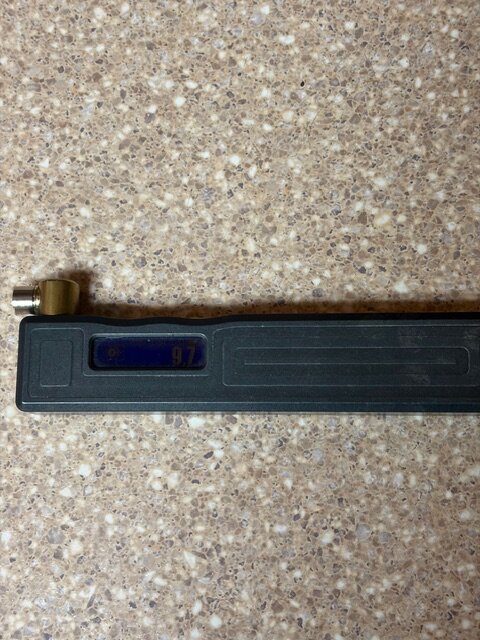
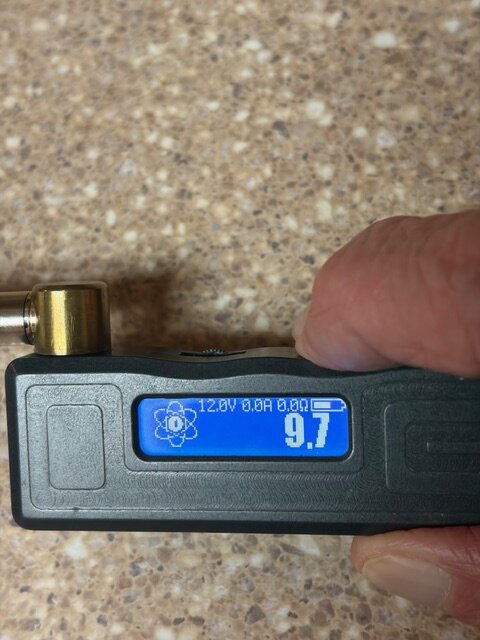 2 points
 -
@Magigamix, I'm glad it's working for you! Turns out the bug wasn't Linux-specific, and was a rather serious bug! Thanks for reporting it! @Alessandro D.... Wow, investigating on Debian 13, the installer script is looking for the package libgtk-3-0, which they have renamed libgtk-3-0t64. Also, they've removed the locate program from the default install, which was my fallback in case the package lookup didn't work. I'm not nearly smart enough to understand the wisdom of Debian, but, I'll change the script to look for libgtk-3-bin. That at least does not appear to have changed. Thanks for reporting this. It will be fixed in the next version. For what it's worth it would have also offered to install mono-complete if you hadn't installed it as well. ECigStats still seems to be broken. I'll need to investigate that.2 points
-
Why use closed source software and restrict the user from doing what they want with their own device? Don't say safety because that's already built into the firmware and anyone working on the it, if it were open source, would be liable to ensure that they leave that alone. Simply the escribe software should be way more free. if you paid for something which is advertised as programmable; So yeah, Infact the box is lying. This is shoddy at best and disappointing for evolv themselves to handicap their product and keep it fixed in functionality. You also can't flash your own custom firmware you build yourself or by using something like redpanda because there is built in encryption stored on the chip itself not giving the user a deviation point. Sad and horrible tbh that the best hardware manufacturer in the world would short themselves like that for consumerism when these devices are for high end users even if this is the lowest one. I wanted to climb the ladder and purchase an lve therion 2 250c because I thought I could, but after looking at that software packet, I couldn't even do what I wanted on this device, on there. Straight up nonsense @Wayneo I feel deceived and I bet the mods will delete my content for making others aware to stay clear if they plan to purchase this device with any form of flexible programming requirements in mind.1 point
-
Yeahp. Go ask/tell Evolv. Help Desk Link in my signature line . ⬇️1 point
-
@Vapors Tongue: The time on the lock screen.... The DNA 60 Color doesn't have a real-time clock, so any clock would definitely have been an estimate from the CPU. I hadn't remembered supporting that, but maybe I did. How accurate did you find the clock to be? What Service Pack did it last work in? Thanks!1 point
-
Looks like both theme and autolock are working correctly now . 👍1 point
-
I've found the bug that causes conditions to be incorrect on that DNA 60 Color test firmware. I've attached a new test version. Give it a try, and see how it works for you! Thanks! God bless. James 1_1_SP137_INT.sw-service1 point
-
@stephanedegee hello did you try to upload experimental software James posted above ? That solved for me the autolock bug For the missing profile , check in escribe "Hide this profile" box in unchecked Regards1 point
-
Open a ‘Help Desk’ ticket ⬇️ Link in my signature line. ⬇️1 point
-
After the latest update of the liquid chip, it ends and there is no warning about the absence of liquid.نا What's the problem?1 point
-
NO. Those are re-wraps. Search for 'battery Mooch' and choose from his listings. Known good brands are Sony, Samsung, and Molicel purchased from a reputable supplier.1 point
-
Hi James, The fallback pkexec textual authentication agent doesn't work (see log and a possible reason at the end) so I reverted to a quick bash onliner. Most linux desktop environments (GNOME, KDE, LXQT, Mate etc.) have their own graphical authentication user agent preinstalled so EScribe Suite perfectly fits with them. In my reported minimal configuration (EScribe Suite is started from a controlling terminal such as xterm), openbox could work too in this way but there are some tweaks to do before the Openbox X Session is started # apt install pkexec lxpolkit $ mkdir -p $HOME/.config/openbox $ echo "lxpolkit &" > $HOME/.config/openbox/autostart $ chmod +x $HOME/.config/openbox/autostart >>> Start Openbox X Session $ startx Here is the log of pkexec's textual authentication fallback agent (EScribe Suite is started from xterm with only pkexec package installed, no lxpolkit) ---------------------------------- < cut here > --------------------------------- ==== AUTHENTICATING FOR org.freedesktop.policykit.exec ==== Authentication is needed to run `/tmp/de-escribe/Grant_USB_Permission.sh' as the super user Authenticating as: root Password: ** (process:1904): WARNING **: 04:55:50.418: Got unexpected EOF while reading from controlling terminal. ==== AUTHENTICATION FAILED ==== Error executing command as another user: Not authorized This incident has been reported. ---------------------------------- < end cut > ---------------------------------- I suspect EScribe should wait pkexec process to get root password from controlling terminal (user has to manually enter it in terminal to be authenticated by polkit) before executing Grant_USB_Permission.sh script I hope this could help you. Bye Alessandro
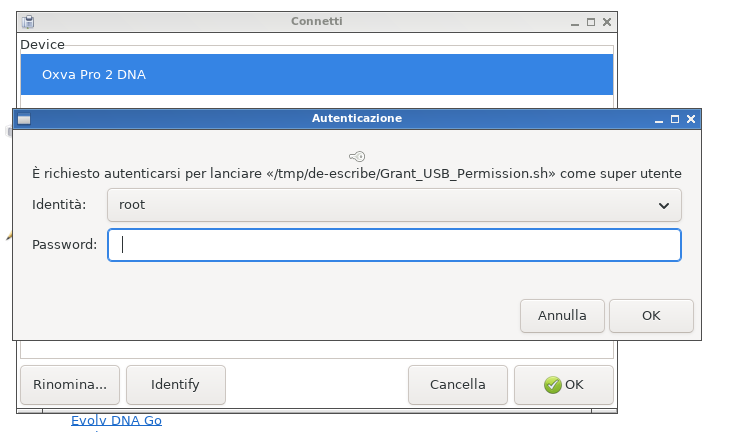
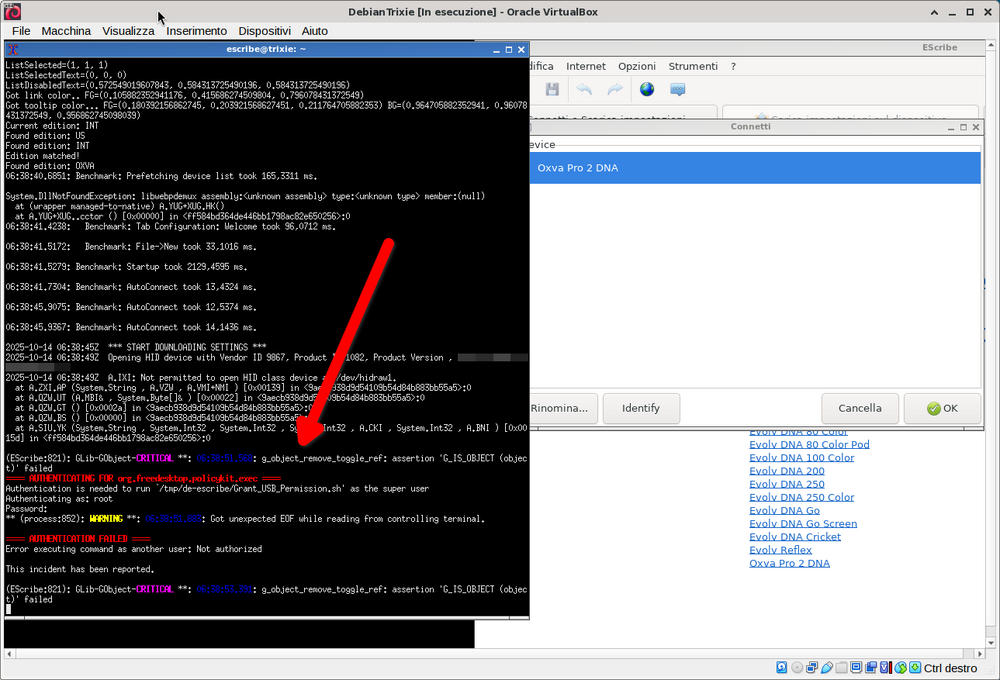 1 point
 -
Normally, the program will recognize that it lacks the necessary permissions and ask for root access to install that rules file if it needs it.. Does pkexec not work for some reason in the setup you are describing? I've made some effort to not require any command line manipulation whatever. Also, I've updated the installer. It will look for libgtk-3-bin now, and use find instead of locate if it can't find that. (Hopefully.) Thanks! God bless. James1 point
-
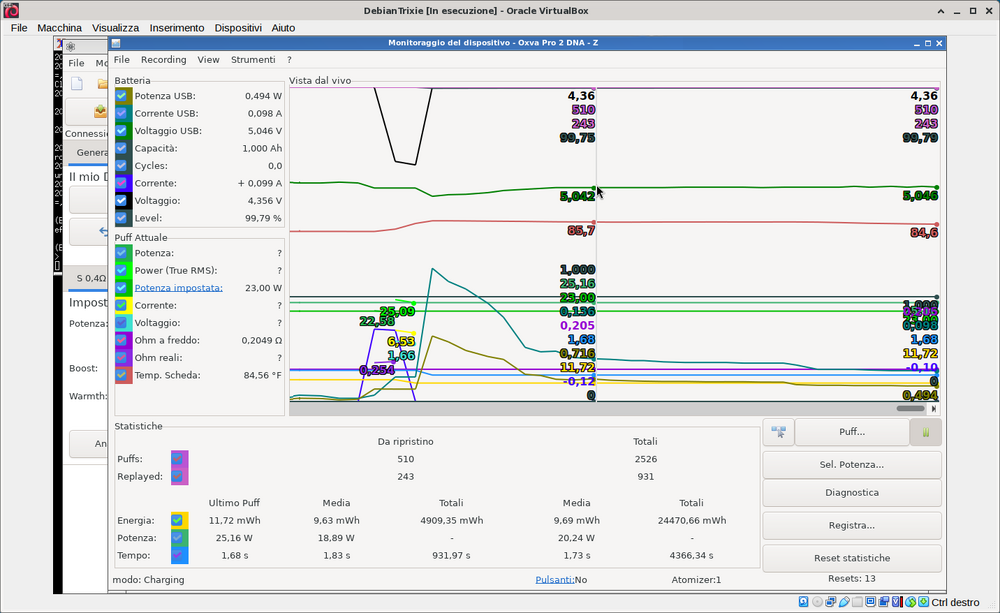
Hi James, thankyou for reply. I confirm Debian 13 has flagged libgtk-3-0 as virtual package # apt show libgtk-3-0t64 Package: libgtk-3-0t64 Version: 3.24.49-3 Priority: optional Section: libs Source: gtk+3.0 Maintainer: Debian GNOME Maintainers <pkg-gnome-maintainers@lists.alioth.debian.org> Installed-Size: 10,3 MB Provides: gtk3-binver-3.0.0, libgtk-3-0 (= 3.24.49-3) Depends: adwaita-icon-theme, hicolor-icon-theme, shared-mime-info, libatk-bridge2.0-0t64 (>= 2.15.1), libatk1.0-0t64 (>= 2.35.1),> Recommends: libgtk-3-bin, librsvg2-common Suggests: gvfs Breaks: libgtk-3-0 (<< 3.24.41-1.1), libgtk-layer-shell0 (<< 0.9.0) Replaces: libgtk-3-0 (<< 3.24.41-1.1) They removed it from essential "findutils" and packaged in its own optional package, so it is not installed by default. # apt install locate Affermative. The package provides libgtk-3-0t64 # apt show libgtk-3-bin Package: libgtk-3-bin Version: 3.24.49-3 Priority: optional Section: misc Source: gtk+3.0 Maintainer: Debian GNOME Maintainers <pkg-gnome-maintainers@lists.alioth.debian.org> Installed-Size: 319 kB Depends: gtk-update-icon-cache, libc6 (>= 2.38), libcairo2 (>= 1.14.0), libgdk-pixbuf-2.0-0 (>= 2.40.0), libglib2.0-0t64 (>= 2.57.2), libgtk-3-0t64 (>= 3.24.49-3), libgtk-3-common (>= 3.24.49-3) Breaks: gtk-3-examples (<< 3.24.13) Replaces: gtk-3-examples (<< 3.24.13) Again, I thankyou for your great work and I look forward to test next version. As a side note, I succesfully installed Escribe Suite SP71 (INT) on a fresh paravirtualized Debian trixie (Oracle Virtualbox 7.2) with a base system and a minimal X window manager (openbox) # apt install xorg openbox obconf xdg-utils mono-complete libgtk-3-bin and libgtk-3-0t64 are dependencies of package obconf (openbox's simple preferences manager) so automatically installed 🙂 Just one note on udev hotplug backend if using a minimal X configuration such as one I reported here. To gain access permissions (without asking interactive password from your WM) to DNA controlled USB device (OXVA XLIM Pro 2 DNA version, in my case) run this Bash oneliner as root: # echo "KERNEL==\"hidraw*\", SUBSYSTEM==\"hidraw\", ATTRS{idVendor}==\"268b\", MODE=\"0660\", GROUP=\"plugdev\", TAG+=\"uaccess\", TAG+=\"udev-acl\"" > /etc/udev/rules.d/60-dimension_engineering.rules or, without backslashes # echo 'KERNEL=="hidraw*", SUBSYSTEM=="hidraw", ATTRS{idVendor}=="268b", MODE="0660", GROUP="plugdev", TAG+="uaccess", TAG+="udev-acl"' > /etc/udev/rules.d/60-dimension_engineering.rules Happy EScribing & Puffing !!! Alessandro
 1 point
 -
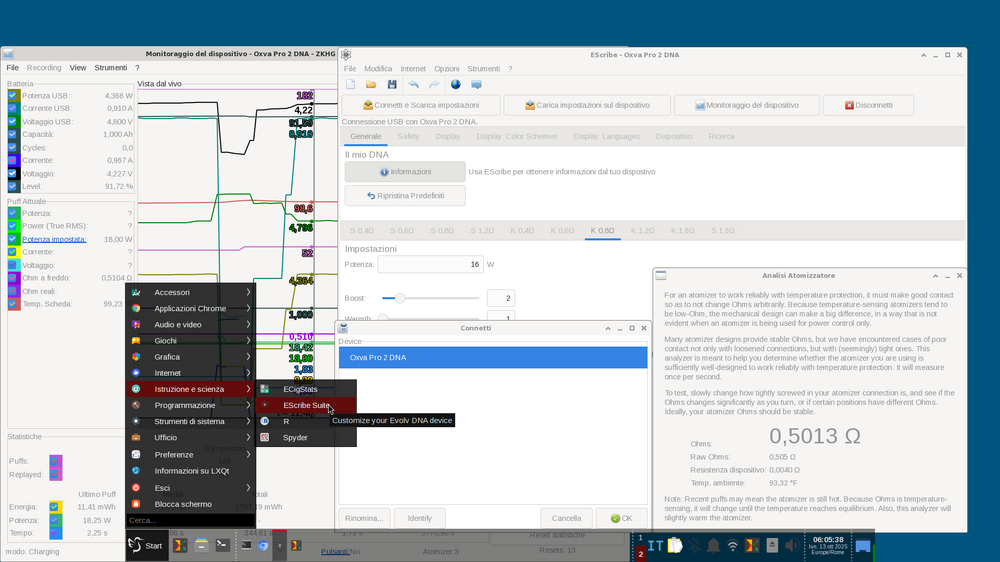
Thankyou for your great work James! Here is my Debian stable / trixie install $ uname -rms Linux 6.12.48+deb13-amd64 x86_64 $ cat /etc/debian_version 13.1 # apt install mono-complete $ mono --version Mono JIT compiler version 6.12.0.199 (tarball Thu Apr 3 15:13:01 UTC 2025) Copyright (C) 2002-2014 Novell, Inc, Xamarin Inc and Contributors. www.mono-project.com TLS: SIGSEGV: altstack Notifications: epoll Architecture: amd64 Disabled: none Misc: softdebug Interpreter: yes LLVM: supported, not enabled. Suspend: hybrid GC: sgen (concurrent by default) $ wget https://downloads.evolvapor.com/SetupEScribe2_SP71_INT.run $ chmod +x SetupEScribe2_SP71_INT.run $ ./SetupEScribe2_SP71_INT.run (It complains about gtk-3-0 not found but installation completes succesfully) > > > Connect E-Cig to USb port $ usb-devices P: Vendor=268b ProdID=043a Rev=01.01 S: Manufacturer=Dimension Engineering S: Product=Oxva Pro 2 DNA Diagnostic information: Firmware Version: 1.1 SP130.1 INT Firmware Date: 2025-09-25 Revision Code: 311113088 It works like a charm on my lenovo ThinkPad T420 🙂 Alessandro
 1 point
 -
I've posted SP71. It includes a number of bug fixes, as well as Fill Pod adjustments for Oxva Pro 2 DNA. Enjoy God bless. James1 point
-
I've posted up a version that fixes the bug with DNA Go and Reflex. If that's the problem you were having, it should be fixed now. Let me know God bless. James1 point
-
Read what you quoted a couple times to yourself. And you forgot to answer this Well? What other mods/pods have you used before this, and do any have adjustable wattage? It is common knowledge to start low and increase to where YOU get the best flavor. My very first puff was at that value and it burned my mouth not the coil. So I set it to 11 and worked up to what I liked which was 15. And 14 on the 0.8. I know it was OXVA that set those wattages for each of the different pods, and the .6 for sure matches with their Kanthal version. So you put in an empty pod at your regular watts, the mod lets you vape, and you don't complain of that nasty cotton taste? So after 1 puff you're throwing them out? That's usually what a person does when a coil burns. If you LOWER your watts and put more juice in any of those pods, do they taste burned?1 point
-
Watts can play a massive role, but the majority of complaints are the exact opposite of yours, with numerous 'fill pod' warnings. You're vaping at the edge. If you read the notes as I suggested, you could use ecigstats, and download a couple of your burnt puffs. The maximum any 0.6Ω coil can reach is 0.558Ω. Yours 0.4158Ω The maximum any 0.8Ω coil can reach is 0.687Ω. Yours 0.6259Ω That's perfectly acceptable, what does not seem right? You hit .62Ω that's so close to the max, ~560F. That won't trigger any warning. For the second time, turn down the watts and try that.1 point
-
I'm not sure man, I've bought mine few days ago and when I put any SS coil first thing it says is anti-burn, yesterday I've tested that feautre, my pod was dead empty and when I tried to vape red light has popped up and on display there was a message "fill pod" So far I'm very satisfied with this pod, this is my first oxva pod, before this one, I was a xros user since first model until 4th generation, before that I had caliburn few models, wenax.... Before xros and generally all in one pods, I had battery mods with sub-ohm coils I'm vaping for over 10 years and this is the most premium "simple" pod I've had. On 0.6 coil - 21w On 0.8 coil - 18w Never had any issue.
 1 point
 -
When you start escribe with your mod plugged in, you will also be given a notification if there are updates.1 point
-
@fp1 No, not the latest. The latest is always the last post here. https://forum.evolvapor.com/topic/66731-early-firmware-and-escribe-suite/page/2/#comments1 point
-
I've updated the Web version of ECigStats to fully support Oxva Pro 2 DNA. In the event that you don't have a PC with EScribe available, you can now use it to look at your puff history, etc. (Previously Web ECigStats only supported the device summary, and barely that.) Obviously, unlike the PC version, it can't stay installed on your system to automatically synchronize puffs when you connect, so it only synchronizes them when you visit the website. But, it might still be useful to you. *shrug* This is compatible with any WebHID-enabled browser, which effectively means Brave, Chrome, Edge, and Opera on desktop operating systems (PC, Mac, Unix, etc.). It's at https://www.ecigstats.org, or the "My Devices" link in the upper-right corner of the Evolv website. Definitely let me know if you run into any bugs with it -- wildly incorrect timestamp recovery, duplicate puffs, etc. Enjoy God bless. James1 point
-
All right. Let's try this again. I found that the Debian and Arch versions of GTK Sharp 3 were seemingly not compatible in some ways. So, this version gets rid of the dependency on distribution versions of GTK Sharp, and instead includes the GTK Sharp fork on GitHub, which doesn't depend on distribution-specific files. It's got its own set of bugs, but it *may* be consistent across Linux distributions. I tested it on Mint Linux and Manjaro Linux, and it worked on both of those. Here's the download: https://downloads.evolvapor.com/SetupEScribe2_SP69_INT_GTK_Test2.run Known bugs: ECigStats seems to not even run in this version. Let me know what bugs you run into. Thanks! God bless. James1 point
-
Got another Arch user here I'm getting the same error as RapideWilson and have the same version of gtk-sharp 3, my kernel is slightly newer at 6.16.6-3. Thanks for all your doing for getting us Linux users running!1 point
-
Even updating too the SP69 and using this it still is giving me the same issues - "fill pod" even though my pod is filled im using the 0.8 stainless steel pods and yes i have tried multiple pods and waited 5 - 10 mins after each fill to make sure the coil is saturated. after i do take a good hit and it registers and doesnt say "fill pod" i can put it in replay mode and the issue doesnt happen anymore until i have to take the pod out. the flavours with the stainless steel 0.8 pods and the way it hits is so much worst compared to the normal 0.8 pods the OXVA pro 2 use. luckily i still have some 0.8 non stainless steel pods so i can use these until this issue is fixed it seems like more off a pod issue compared to the actual software from what i can tell because the OXVA PRO DNA 2 works just fine with the non stainless steel pods, its just very disapointing that i brought this vape for the anti burn and replay but i cant even use it because the pods were not made correctly.1 point
-
I’ve been experiencing this less in general especially since the .8 just burns the coil instead. I have 1 device with this update on it and 1 that doesn’t and didn’t notice a difference switching off1 point
-
The USB charger chip we are using on the Oxva Pro 2 DNA has a "system reset" feature which is specified to activate at nominal 12.5 seconds of button press (by specification, between 9 and 14.5 seconds). This is handy in case your device locks up, but it does mean we actually can't extend the puff time much in software. Had we made it (say) 10 seconds, there'd be some fraction of devices out there that would reset before they got to the end of their puffs. Sorry about this. If you don't mind me asking, do you vape very long puffs or is this a special or research use case? Thanks! God bless. James1 point
-
Přispívám svou trochou do mlýna a přidávám český překlad programu. Je v něm přeloženo vše, co je momentálně možné přeložit. Pokud najdete nějaké nesrovnalosti v překladu, neváhejte mne kontaktovat s požadavkem na nápravu chyby. Všechny možnosti programu nevyužívám, takže nemám na 100% vše ověřeno. Takže užívejte. cz.po1 point
-
No problem - that's what we're here for 👍🏻1 point
-
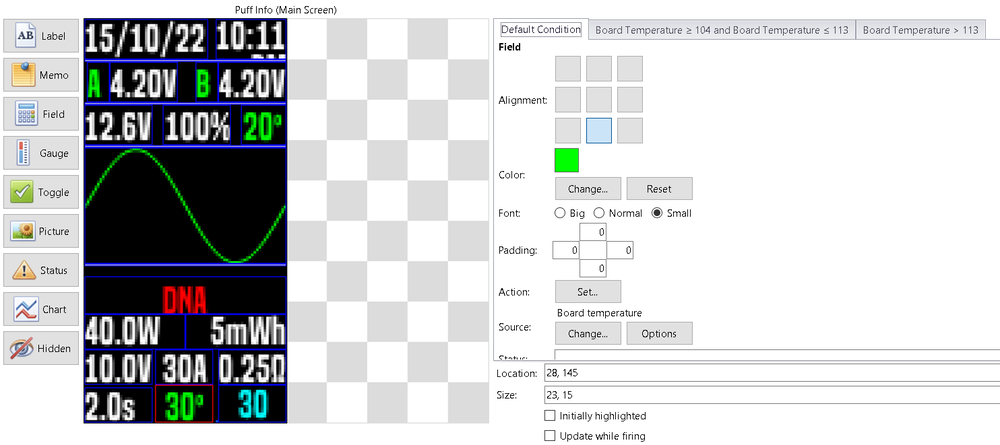
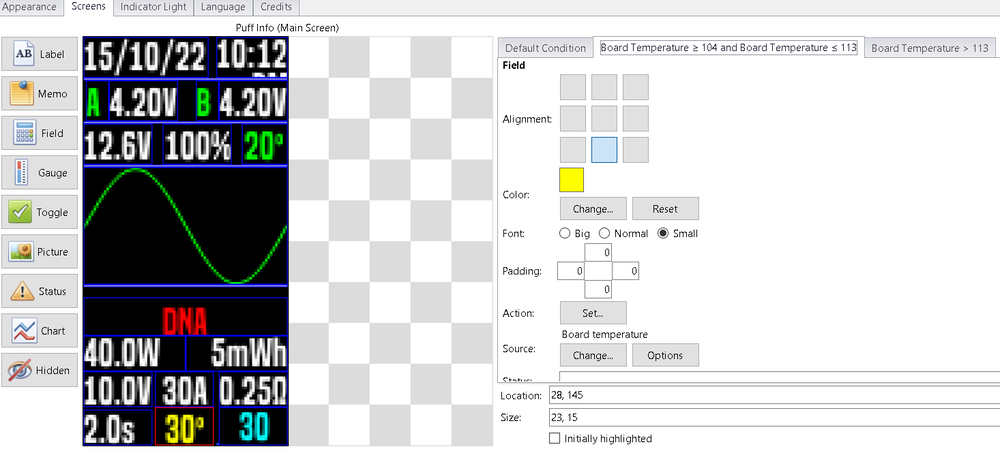
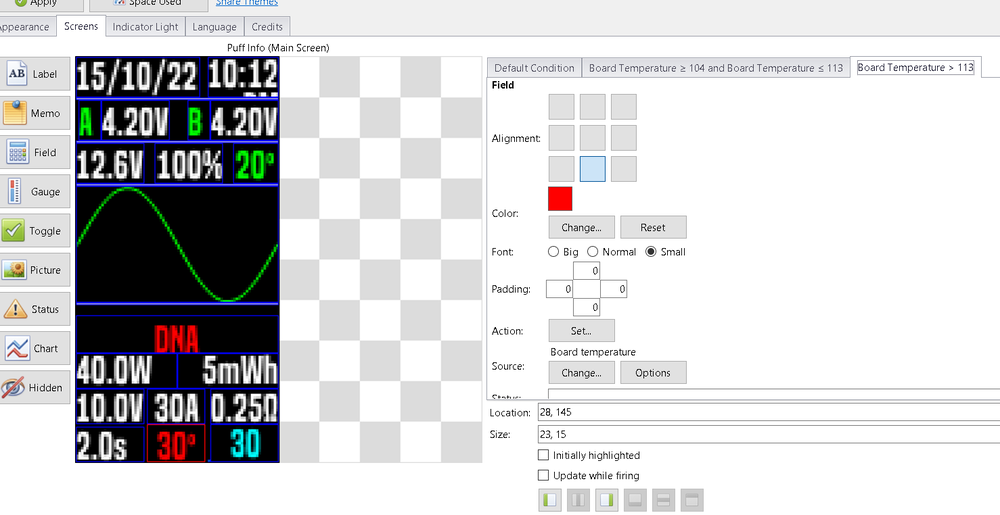
Yes, I did it an hour ago, and now it's working, I tested before posting a reply. you have to do it in Fahrenheit, and then the interface will convert them to Celsius, mystery solved , thank you very much, I believe I finally have my theme finished, not a fancy theme, but it has everything in hand, unfortunately I can't do the fading active time config on the mod, but well, maybe in future. thank you CMK for your help
 1 point
 -
Guess my mistake: enter the corresponding values in Fahrenheit... 104 / 1131 point
-
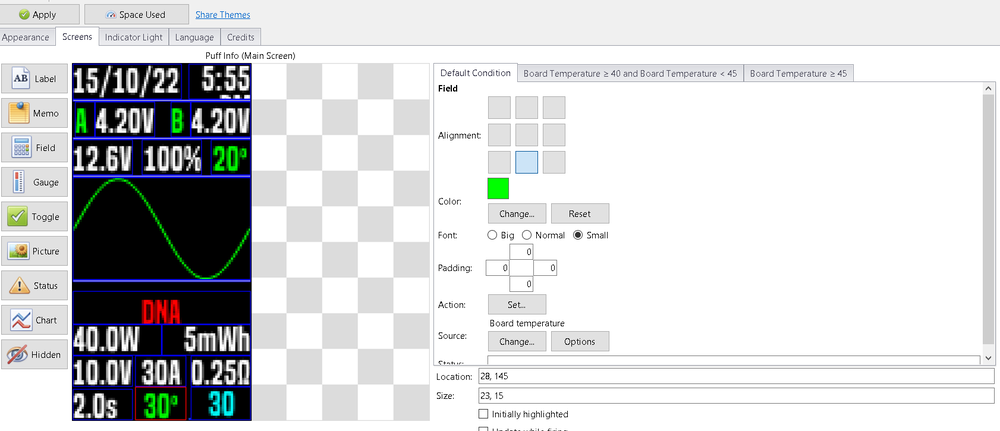
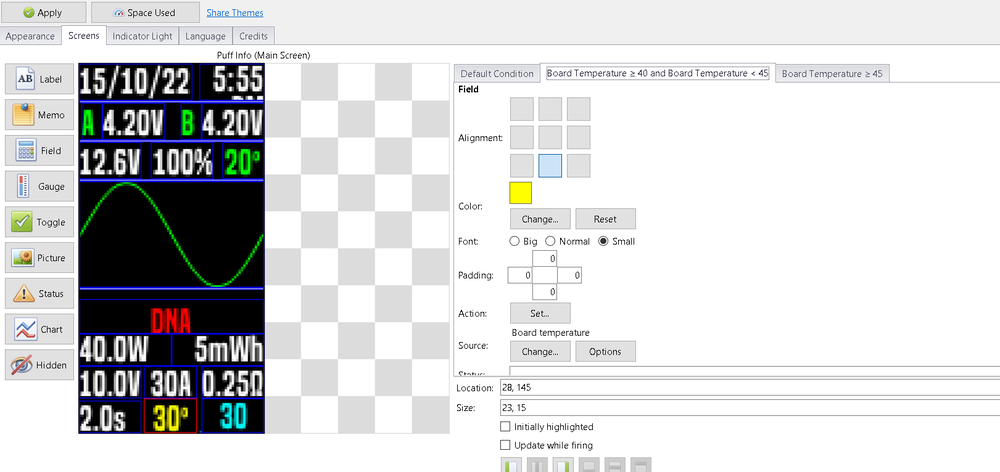
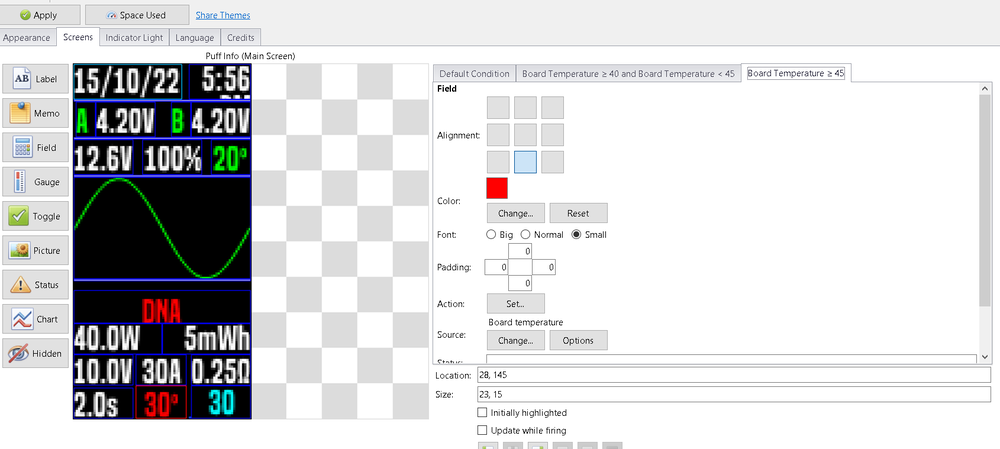
Back it didn't work, I have no explanation for this, I've tried many, many aproxes and never works I end up always with RED for all temps. Does anyone have any idea of what I'm doing wrong, this time I even performed hard reset, back to the default theme, and configs, and nothing.
 1 point
 -
Which brings me back to my favorite question - which theme is used? Stock theme or custom theme? If custom theme, which one? Some very popular custom themes have serious bugs in the replay / TC implementation.1 point
-
Boost Punch (1-11) is a 1 second proportional extra watts before settling back to your set watts. Any material. Preheat Punch (1-11) is only for Temp Sensing materials. The higher the number, the closer it gets to the Temperature set before ending Preheat settings. So the preheat won't let your watts get much above your set temp. You could end up getting the 'karloz bump' for a quick bit. Boost knows nothing about temp. No, will not boost the same All preheat settings will end the closer yo get to the preheat temp/punch value. The TFR is for a material type, not related at all to atty or airflow or coil specs. That sounds more like the wrong cold ohm setting (value). I only ever use Replay in 'watts' material with SS316, SS430, Invar 36, Titanium. Others will promote combining it with TC but I do not. Makes your life much harder, and should really only be needed in a very few unique instances. You can see all these differences (answers to your questions) with Device Monitor, with the Power, coil ohms, and temp boxes enabled (checkboxes)1 point
-
Well, the display of the Preheat temperature is quite interesting, but to set this directly seems pointless, since the chipset works in fixed increments. As far as I interpret the behavior correctly, these steps are dependent on the set target temperature, as well as the exceeding of the TC target temperature in Preheat is not possible - even if the direct temperature input suggests something else. There is a direct dependency between Preheat-Temp and Preheat-Punch. So I decided to optionally display the preheat temperature (assigned by the chipset) - but the setting is done as a preheat punch. Should someone explain to me in an understandable way that my explanations are wrong, I will go back this step, of course. In the following standard topics, I have added a screen on which these dependencies can be observed well: PreHeat-Boost-Test.ecigtheme1 point
-
To read or take part in the discussion about this thread please go here: https://forum.evolvapor.com/topic/65665-topic/ To receive a notification of updates please use the Follow button at the upper right of the page.1 point
-
I am going to post here software and firmware Service Packs before they go on EScribe Suite's auto-updater, for those interested in trying things early, and so if yall find a bug we don't release it to the auto-updater. We appreciate your help testing these. RECOMMENDED SERVICE PACK EScribe Suite 2.0 SP77 EARLY SERVICE PACK EScribe Suite 2.0 SP771 point


.thumb.jpg.a21e2bc6a6a2439a8c97330238778481.thumb.jpg.f6954db18188e59ab08f3ac385c64286.jpg)





This leaderboard is set to Detroit/GMT-04:00