All Activity
- Yesterday
-
 pram joined the community
 - Last week
-
OXVA Pro 2 DNA - Zero-Two theme - work in progress.
pikoslav replied to blaQ's topic in Themes and Custom Screens
ive been using your theme for some time already. the readability is pretty bad. also the replay button is too small for the icon, i never actually saw what the icon was until i zoomed in on it on pc. i finally got to it, and edited your theme to make it readable when outside. created some icons for it, and also changed leds to serve more of a functional purpose and couple of icons too. you need to have roboto condensed bold font installed on your pc for it to work (i've set the font to roboto condensed bol 21pt and 26pt because they work good for this screen). zero-two_customized.ecigcolors -
pikoslav joined the community
-
 rufino goh hin aun changed their profile photo
 -
raanggo joined the community
-
Schleim joined the community
-
riedel joined the community
-
Samuelsam joined the community
-
What battery % does it show after being fully charged?
-
Bogytoto joined the community
-
What do you mean? I need to somehow fix the problem with smoking above 0% battery percentage
-
Thanks, that makes sense. I actually ended up finding and ordering a purpose-built OFC copper 510 shorting plug for DNA/EScribe calibration. I figured by the time I bought an adapter and the soldering equipment, this would save me some headaches. Once it arrives I’ll run the calibration and report back with the results. Appreciate all the help!
-
Charge your battery when it gets low.
-
Hi, for over half a year. I have a problem with a battery percentage on my screen. At first, i was able to smoke even with 0% percentage on my screen. Then i noticed that after 2-3 puffs, percentage dropes by 1%. So 2-3 puffs -1%. And i can’t figure it out, why is it like this
-
Bodyan107 joined the community
-
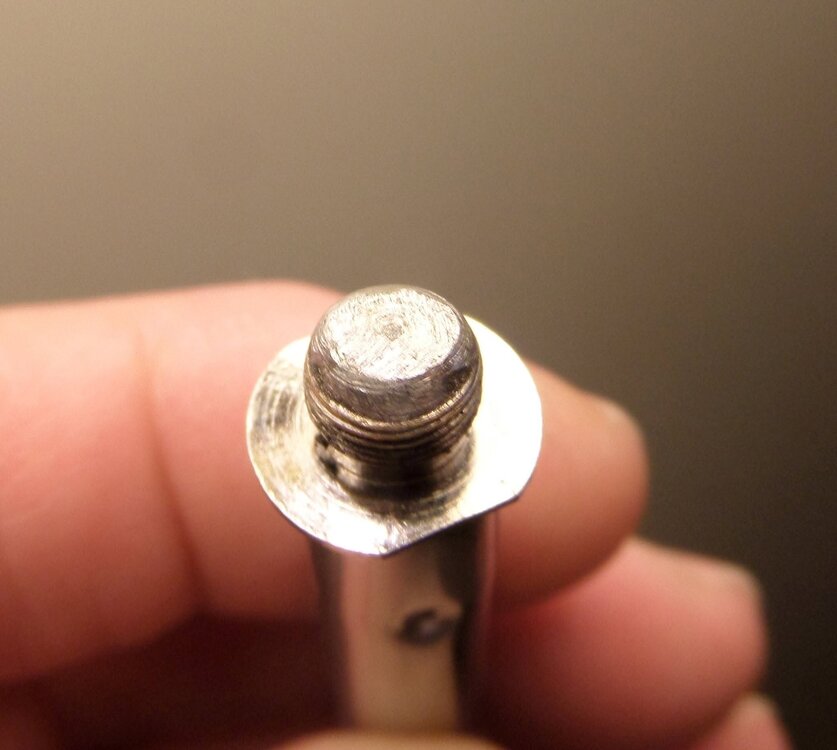
 Yes I removed the gasket, coils and packing. It wouldn't make any difference though. A 510 to 510 adapter or any old atty no longer wanted will do also. You can use the solder of your choice btw. Also it will require a mini torch or a high wattage iron. I used solder and flux for water pipes simply because I had it.
 -
Ah, got it — an old Smok dual-coil cartomizer. Thanks! Did you remove/gut the coil and then silver-solder the center connection directly to the outer 510 body to create the short?
-
If you mean what is pictured, it's a Smok dual coil cartomizer.
-
Thanks, that clears it up! I understand the calibration procedure now — set mod resistance to zero, upload, measure with the shorted 510, then enter that reading and upload again. One last question: what type of 510 connector did you use to make your calibration short? I’d like to make one similar to yours rather than guess at the hardware.
-
Yes and yes. Follow directions, first set to zero and upload to device then measure and upload reading to device.
-
Thanks! So if I understand correctly, you essentially made your own low-resistance calibration short by silver soldering the 510. Do you use that with EScribe to determine the mod resistance? Also, what resistance does EScribe typically read with yours connected?
-
I silver soldered the 510
-

Odin DNA250C consistently reads atomizer resistance higher than Pico
Wayneo replied to profess0r2000's topic in DNA 250 Color
Evolv never made one, but a user did. That's what I use, but another moderator uses the shorted 510. You should also do thermal calibration. -
Thanks. Understood. I'll stop the material-curve testing for now and independently calibrate/verify the Odin's mod resistance first. I restored the manufacturer's defaults and 0.004Ω is the factory value, but I haven't independently measured the device's internal resistance. What calibration method would you recommend for a DNA250C/Odin if I don't have Evolv's copper calibration plug? Is the shorted-510 method appropriate for a DNA Color, or would you recommend a known-resistance load/TC wire instead? I'll also open a Help Desk ticket as suggested.
-
Odin DNA250C consistently reads atomizer resistance higher than Pico
Wayneo replied to profess0r2000's topic in DNA 250 Color
SO YOU COMTINUE WITHOUT CALIBRATING YOUR MOD AND ASK ME TO COMMENT. And no, i wouldn't want to look at any csv, certainly not a Pico. The mod measures coil resistance, and now with more information (Terpometer? never heard of that. Exterior ceramic?). At some point (no other comments) you should open a Help Desk ticket. Link in my signature line. -
Update — I did some controlled testing with a Terpometer and EScribe Device Monitor. DTV5 XL with SiC insert on a DNA250C. Factory mod resistance is 0.004Ω and cold resistance is consistently around 0.466–0.469Ω. With a linear TCR200 material at 25W/250°F, the DNA sees Live Ohms around 0.474–0.475Ω as ~250°F and starts throttling heavily. However, direct Terpometer measurements showed the exterior ceramic only around 113°F. I then switched to plain Watts mode (Boost off) so TC couldn't interfere. At 20W I measured approximately: Cold: 86°F / ~0.467Ω 5 sec: 120°F / ~0.485Ω 10 sec: 156°F / ~0.499Ω The resistance rise in Watts mode is smooth and repeatable, and the SiC and exterior ceramic measurements are quite close. Does this suggest that a linear TCR200 curve is inappropriate for this particular V5 XL heater on the DNA250C? If so, does anyone have the current recommended DNA material CSV/curve for the V5 XL, or experience creating an individual material curve from measured temperature vs Live Ohms? I'm especially interested in whether the old V5 TSM workaround/custom point near ~200°F is still recommended for the XL, or whether individual heater calibration is now preferred. I haven't changed the DNA's factory 0.004Ω Mod Resistance.
-
Thanks — I did some more controlled testing based on your comments. I restored the Odin to the online Dovpo manufacturer defaults and left the factory Mod Resistance at 0.004Ω. I then created a fresh temperature-sensing material using a linear TCR of 0.0002 (TCR200), with no preheat or Session Mode. With the V5 XL completely cold, Atomizer Analyzer is stable at 0.473Ω (Raw 0.477Ω) around 84°F. Moving/twisting the atomizer does not change the reading. I then measured the cold resistance for the TC profile and recorded a short 25W / 250°F run in Device Monitor. The CSV shows Cold Ohms at 0.466Ω and Live Ohms rising approximately: 0.469 → 0.472 → 0.473 → 0.474 → 0.475Ω As it approaches ~0.475Ω, the DNA calculates approximately 250°F and throttles the power substantially. However, a direct-contact Terpometer on the SiC insert only reaches roughly 125–130°F. I also noticed occasional anomalous samples in the EScribe recording, including a calculated temperature spike around 756°F / an 800°F Temp Peak, despite the 250°F setpoint. For comparison, I put the exact same atomizer on an Eleaf Pico running ArcticFox. I verified the Pico profile is also set to Temperature Control, TCR200. The Pico reads the atomizer around 0.45Ω cold and heats the SiC substantially more at the same nominal temperature setting. So at this point I'm hesitant to change the Odin's Mod Resistance or compensate by increasing the temperature/TCR. Does the DNA resistance/temperature behavior above look normal to you? In particular, would the transient ~756–800°F calculated samples suggest an electrical/contact issue, or is that something Device Monitor can report during normal transitions? I have the EScribe and ArcticFox CSV recordings available if they would help.
-
Thanks, that helps. I hadn't accounted for the DNA normalizing the cold resistance to 70°F. I'll check the cold-ohms value in the TC profile after attaching the XL heater cold. The bigger issue I'm trying to understand is that Device Monitor reaches the TC setpoint and throttles power while a direct-contact thermometer on the SiC surface is still substantially below the expected temperature.
- Earlier
-
Odin DNA250C consistently reads atomizer resistance higher than Pico
Wayneo replied to profess0r2000's topic in DNA 250 Color
No idea if Dovpo made any changes from the evolv defaults, but you can run those yourself. As well as setting/checking the internal mod resistance. Who even knows if your Pico is accurate. Atomizer analyzer also showed you a temperature. Your mod uses that temperature to figure out internally what cold reading is at 70ºF for TC. You can see that in your TC profile right after the coil Ω's. -
Hi all, I'm troubleshooting a Dovpo Odin DNA250C that appears to be reading resistance higher than another mod. Using the same completely cold atomizer, without firing: Odin DNA250C Atomizer Analyzer: 0.469Ω (Raw 0.473Ω) Eleaf Pico/ArcticFox: 0.450Ω (Live 0.451Ω) Odin factory Mod Resistance: 0.004Ω I also tested a second atomizer and saw the same pattern, with the Odin reading noticeably higher. So far I've cleaned the 510/contacts, checked for resistance changes while gently moving the atomizer (stable), reapplied the DNA250C service pack, and performed an online Restore Defaults from Evolv, which restored the original Odin manufacturer configuration/theme. The resistance reading remained essentially unchanged. This matters because I'm using temperature control and the Odin reaches its calculated temperature while the actual heater runs substantially cooler than it does on the Pico. Before changing the factory 0.004Ω Mod Resistance or opening the Odin, is there a recommended DNA250C procedure for determining whether this is a 510/internal resistance issue, board measurement issue, or calibration issue? Thanks!
-
profess0r2000 joined the community
-
Vincent1988 joined the community
-
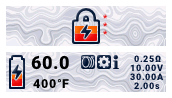 i like this theme a lot. easy to reed. every menu item has a description making it easy to understand. i dont know the first thing about theme design so i appreciate all the themes that available for download on this forum and this is the theme i enjoy using the most for now. thanks Fecti
 -
New theme American color: blue, white and red. Theme forAmerica.ecigcolors
-
 BSmods changed their profile photo
 -
I will troubleshoot a bit myself and worst case try replacing it. As far as powering off goes, it sounds more like this is a "works as designed" for DNA devices. Good to know and thanks for the clarification.
-
10-20% in a day!!? seems if that's true, you may have some other issue. I have left mine for upwards of a week & seen less than a 15% drop in battery. To solve your problem with the button firing mode and it accidentally firing somehow, you can rapidly click the fire button 5 times to engage a fully locked, un-puffable state, right? I'm not sure if you're a seasoned DNA owner or not, but none of them (that I own or am aware of) actually fully and completely "power down" in the traditional sense. They generally will fall into the the sleep state James mentioned, and in this state, they consume comically small amounts of power. Of course, people should remove their batteries if not planning to use their DNA mod for a length of time on applicable mods , but The One, easily has the most run time - and consequently, the most standby time out of any pod system in my collection. So yeah, just manually lock it by pressing the fire button 5x, like all other products made by Evolv. Drain will be negligible & accidental activations become nigh impossible. Also, you may want to submit a ticket if you're truly seeing up to a 20% decrease in standby battery drain over a 24hr period. That is not even close to what it should be under reasonable environmental conditions. I don't lose 20% using it for the day, I believe last I misplaced it for around 5 or so days, it was around 82% when I found it almost a week later. Cheers! hope you find the solution you're looking for!