
-
Posts
5 -
Joined
-
Last visited
liquid's Achievements

Member (2/3)
0
Reputation
-
My friend's DNA75 can show it, I'll ask him how he did it
-
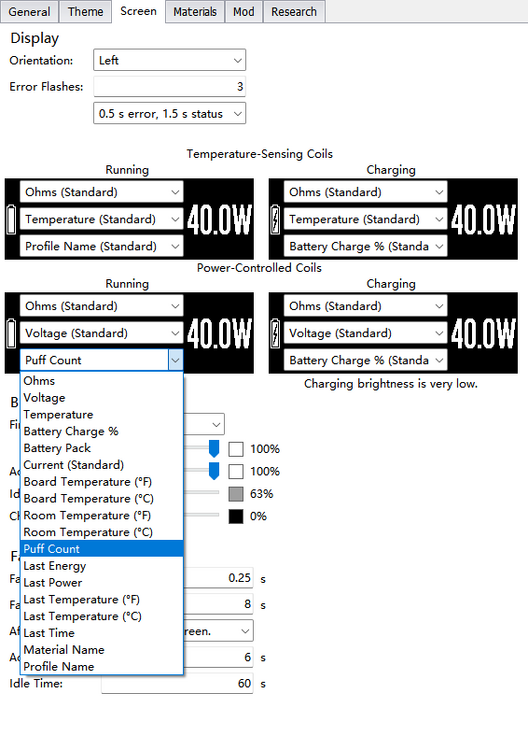
How can I make the boost value set on the DNA60 show up on the screen? I didn't find this option in the drop-down menu, but I've seen others display the current boost value on their screens. I’d be really grateful if someone could explain.
-
 我更新了固件,为了判断问题是芯片还是线圈引起的,我拆开了一个烧毁的烟弹,只保留线圈。然后我点火,带着那个线圈,这次它正常显示了“加注舱”警告。 所以看起来芯片和线圈都正常工作。 也许问题是我自己用得好,而不是硬件或固件的问题。 VID_20260905_222402.mp4
-
New XLIM Pro 2 DNA - Confusing Anti-Burn & Resistance Readings
liquid replied to ZobiFun's topic in Oxva Pro 2 DNA
I have encountered this issue as well. Have you resolved it? -
Hi everyone, I’ve been checking many threads about the “fill pod” warning on the Oxva Pro 2 DNA. Most people seem to have the opposite problem — they get frequent “fill pod” messages even when the pod still has plenty of liquid. But my device is the other way around. I’m using the SS coil, and when I insert the pod it shows “anti burn,” but I never get any “fill pod” warning at all. Because of that, I’ve already burned two pods. I’ve read a lot of replies and checked my settings in Escribe. Under Safety → Fill Pod, the feature is enabled, and I even set it to “High.” So my question is: Could this be a chip/firmware issue? My firmware version is 1.1 SP125.1 INT. Any help or insight would be appreciated🫶
