

-
Posts
24 -
Joined
-
Last visited
-
Days Won
3
Content Type
Profiles
Forums
Downloads
Everything posted by JoeBingo
-
REF: Cthulhu Sentinel with DNA 60C ... random mod lock and random mod misfire Just a follow up to add what finally resolved the issue of random locks and misfires during normal use of the Sentinel mod. In EScribe, I changed the number of fire button clicks to lock/unlock the device. Default from Cthulhu was set to 3 clicks lock/unlock and I changed that to 5 clicks. No more random locks and misfires during normal use. My guess is that my vape habits and time between clicks of the fire button during normal use interfered with the lock/unlock sequence protocol of the DNA 60C Initially I looked for a setting to specify how slowly or rapidly the fire button needed to be clicked in order to lock/unlock the device and found no such setting. Maybe the time between clicks during a lock/unlock sequence is in the firmware of the DNA 60C and can't be user changed. Anyway, 5 clicks to lock/unlock seems to be the industry "standard". I was happy to see Cthulhu sent it out with a 3 fire button lock/unlock but for me, it caused intermittent and random problems.
-
Okay, so I'm thinking maybe there's a "never mind" due LOL I couldn't wrap my head around how a software setting could affect something that seemed hardware related, so I took the Sentinel back apart. On the back of the fire button was a sticker. A not well centered sticker on the back (inside) of the fire button and similar in diameter as the button. I took that sticker off and the Sentinel is more clicky now. I think that sticker may have been ever so slightly interfering with the fire micro switch and circular rubber mount around it. And in doing so, the mod was glitchy. Sometimes not firing and sometimes when I tried to fire, I would find the DNA 60C locked. The button seems to work better now and my mind is trying to reason why that sticker was on the back of the fire button to begin with. If I shake the mod deliberately, I can hear a faint rattle. At first I thought maybe the sticker had some needed insulation value since the button is metal. But now I think the sticker was a silencer. With the sticker in place, perhaps no rattle when deliberately shaking the mod. Since shaking the mod is not something I routinely do, it's a non factor, and without the sticker the mod functions well. On the other hand if anyone has any anecdotal information they've found with the fade-in and fade-out settings, do chime in. Thank you.
-
REF: DNA 60C on a Cthulhu Sentinel mod ~ only used in Watts mode. 1.8Ω at 7W First thing I did when I got the mod was download EScribe and start leaning as I went along, how to modify settings to the style I wanted. No matter if I came up with a custom theme or the default theme that came with the Sentinel, I always changed the active time from the default 30sec to 7sec. On the same page, I tried to change the fade-in and fade-out time to 0sec but EScribe always defaulted to a minimum value other than zero for each and I would save upload those values. Over the course of using the Sentinel, I experienced random glitches. A press of the fire button might not actually fire the mod and sometimes I'd press the fire button only to find the device locked. The random glitches became annoying. I tried over and over, rotating between service packs, my custom theme and the theme that came with the Sentinel. Each time I tried those things, I always set the active time to 7sec and fade-in and fade-out to as low as EScribe would allow. The random glitches continued and I became annoyed to the point of taking the Sentinel down to parade rest to see if I could spot an obvious problem with the device itself and found nothing wrong. I reassembled the Sentinel and still experienced random glitches to the point of almost ready to toss the mod. For grins and giggles I decided to leave the fade-in value that came with the Sentinel at 1sec. And I changed the fade-out from 2.98sec to 2sec. That was a couple of days ago and since making that one change to my pattern of settings modifications, I have not experienced any random glitches at all ... knock on wood. So you tell me, the Sentinel fixed itself? ... taking it apart and putting it back together eventually changed something? OR ... the screen fade-in and fade-out value had something to do with it? I can't wrap my head around how those fade-in and fade-out values could impact mod firing and readiness, but there it is. Those values are the only thing I tired in EScribe when all else failed to correct random glitches. I'm using the latest service pack, active time is 7sec, Fade-in is 1sec and Fade-out is 2sec. Works every time all the time now. I guess I could test it and try zeroing out the Fade-in and Fade-out to near zero as I always had previously to see if the glitches return but decline to do so.
-
 In the Linux Mint distro world (and many others) under a similar software release philosophy, they call it a BETA release. Been that way for well, always. Available to anyone who would like to have it for testing and evaluation before posting a finalized update release to their servers. Beta / Early ... same difference I guess. I'm just becoming familiar with "your" terminology and semantics. Thanks
 -
... I had overlooked those pinned posts because they are labeled as "Early ..." and thought they maybe had no current relavence . D'OH
-
Thanks !!! ChatGPT can rest easy
-
Okay, so no one has chimed in with thoughts and I have not been in contact with Evolv. So with that said, I will try to answer my own questions with my best guess. 1) Any idea what the differences are between U.S. and INT service packs with the same numerical release? Historically, some firmware or SP releases included features or options that were only in the International edition, either because the feature set wasn’t compliant with certain regulatory restrictions in the U.S., or Evolv wanted to test new or experimental features internationally before wider adoption. For example, older SPs sometimes enabled Boost or other features only in the International Edition of the firmware or EScribe build. However, overall the numerical version itself (like 1.1 SPXX) refers to the same core service pack release. The U.S. and INT builds typically differ only in regional compliance bits or included features rather than major functional divergence. 2) Given they are numerically the same, which should I use, the latest INT or latest U.S. version ... or whichever one is recommended? If your device was sold in the U.S. and you want to stay within U.S. compliance, then using the U.S. SP makes sense. The International SP will generally work fine too (they are not usually restricted), but could include options or behavior that were originally intended for markets outside U.S. regulatory constraints. EScribe’s built‑in Update/Check for Service Pack feature sometimes auto‑recommends the INT version even for U.S. users. This behavior seems driven more by the latest unified build being marked as recommended in Evolv’s servers, not necessarily because the INT is “better” for U.S. users. Why EScribe might suggest INT first: EScribe’s update service likely pulls a default recommended build that is not region‑specific. Evolv’s backend does not always segregate recommendations by U.S. vs Int based on your computer locale. Thus even on a U.S. EScribe install, the INT build may show as the recommended update. 3) When update service packs are released, is there any documentation as to what was changed from the previous service pack? Official Evolv documentation does not publish detailed change logs for every Service Pack. Evolv’s website and support pages do not provide a comprehensive public changelog for SP releases. Final thoughts about the practical reality of all this as pertains to my DNA 60C: Functionally and operationally, both U.S. and INT service packs which are numerically identical are also effectively identical. The firmware code controlling power, boost, screen, menus, and safety checks is the same. There are no extra features in the INT build that affect how the board works day-to-day. The only differences, if any, are “region tags” or regulatory compliance markers that Evolv embeds in the build. For example, Evolv might flag the U.S. SP as meeting FCC/UL requirements. The INT SP is flagged for non-U.S. markets and might include “experimental” options in some larger boards (but DNA 60C doesn’t have those). Bottom line: For a DNA 60C, you can safely assume that the U.S. and INT SPs with the same number are essentially identical. The difference is mostly for Evolv’s internal labeling and compliance bookkeeping, not for anything you’ll notice while using the device. ... am I wrong? 🤷♂️
-
OH ... Just to add ... The EScribe version I downloaded and installed is the US Version for Windows. So that isn't an influence as to why maybe the recommendation is to upgrade with an INT service pack. In fact, the recommendation seems counter intuitive when there is a US service pack available with the same version number. That's why I asked the questions in the OP, to try and wrap my head around it. Thanks !!!
-
When device is attached to EScribe and a Service Pack update is recommended, it seems to always be the INT version. When I go to the install service pack tool, I sometimes find the same numerically numbered SP but with a U.S. designation. I'm in the U.S. so it would seem the U.S. SP would be preferred, but in the install menu, the INT version is still listed as "Recommended" in parenthesis. Questions: 1) Any idea what the differences are between U.S. and INT service packs with the same numerical release? 2) Given they are numerically the same, which should I use, the latest INT or latest U.S. version ... or whichever one is recommended? Also I don't know if the information is even available publicly, but ... 3) When update service packs are released, is there any documentation as to what was changed from the previous service pack? Thanks !!!
-
Oh how I was wrong LoL. The Evolv DNA 60C is awesome and Evolv, with a keen eye on safety, performance and reliability, has allowed for ALL vaping persuasions. Sometimes devices don't arrive perfectly configured from a manufacturer or vendor, but that isn't Evolv's fault. The possibilities are there for the choosing in EScribe. With invaluable help here, I've gone through the bonding phase and have my device dialed in perfectly. I apologize for my earlier naive, newbie observation. D'OH
-
Thank you for the patience, consideration, suggestions and support @Wayneo ... continues to Evolv
-
Now if I can only figure out how to set something so that the DNA 60C circuitry queries the atomizer routinely for resistance rather than only during firing. In other words, when I attach an atomizer, the display should automatically show the current coil resistance rather than all zeros ... until I fire.
-
Is there maybe a downloadable theme here that I might be able to temporarily upload to my device just to see / copy how they did it? EDIT: @Wayneo ... nevermind. Actually your pointing me to the Power Options Settings in themes allows me to do EXACTLY what I need to do for my theme. Thank you sir
-
Thanks @dwcraig1 and @Wayneo for sorting me out on this. Greatly appreciate it !!!
-
@dwcraig1 ... thank you for all your patience and help. I'll have to fiddle with everything a bit more, but I've learned I can dial in a virtually perfect vape for me. I'm real close now. Just need to sort behavior of Evolv software and hardware. Couldn't have done it without EScribe or without your help. Thanks !!! I'm done for tonight. It's late and I'm old HA
-
One other thing of note @dwcraig1 ... If while in that profile I've set to 6.5W, I happen to manually change the wattage on the device with the +/- buttons ... the device will not go back to the 6.5W. It will fire at the whole number for which I've manually selected. Consequently I will need to configure a profile for any partial watt value and remember not to manually adjust the wattage on the device ... change the profile on the device instead. If that makes sense.
-
Good call @dwcraig1 and you nailed it. When set to 6.5W in the EScribe profile, the vape device I'm using and Evolv hardware displays 7W. But when I check Device Monitor in EScribe and take a pull, Current Puff Power is ~6.5W So for device display, the actual power setting is rounded to a whole number but the device is still powered IAW profile setting as proven by Device Monitor. Good call. Thank you for following up on this.
-
@dwcraig1 ... What I just now tried in EScribe ... By default as the device arrived, my Watts profile is profile 2 in EScribe. In the Settings > Power field of that profile, I changed the value to 6.5W Then I uploaded settings to device ... The DNA 60C display on my Cthulhu Sentinel immediately showed 7W ... the Evolv software rounded up a half watt. Hmmm ... thinking out loud, but maybe there's a setting somewhere in EScribe about how it handles decimal places or something ... dunno 🤷♂️
-
Thanks @dwcraig1
-
AH ... another good point & suggestion @dwcraig1 !!! Thank you. I hadn't looked at it in exactly that way. That still only allows for 8 settings. Should be enough ... IF the Evolv software actually calibrates and delivers to a fraction of a Watt ... 6, 6.2, 6.4 ... 7, 7.2 etc etc for example.
-
Overall, my impression is that Evolv has all their eggs in one basket with the DNA 60C and cater to the TC cloud & flavor chase crowd with little concern for the low watt Kanthal tootle vape guys. It is what it is I guess. I'm just trying to adapt it to my needs. Thankfully so far I can call it good ... but not awesome.
-
Thanks @dwcraig1 for the valuable suggestion !!! This EScribe newbie will have to play around with that idea. Just the suggestion gets my wheels turning and thinking maybe I can change the field in the existing Watt profile and save it. But at the end of the day, I would like to change Watts in smaller increments on the fly rather than drag out my Windows laptop and hookup the Sentinel each time I want to change fractions of a Watt. Yes, drag out my (old and slow) Windows Laptop. I hate Windows. My desktop computer is running Linux Mint LMDE 7 (so, Linux). I have in fact figured out how to dumb down my theme in ESCribe and hide unused or not needed profiles. Right now I only have two(2) screens on my DNA 60C. A lock screen and a main screen that only shows ohms, watts and battery level. That's all I need. There are a few other changes I'd like to see in the Evolv software: For one, I'd like to be able to run in total stealth mode and peek at the main screen with one quick press of the fire button only when needed. Oh and another thing I'd like to see is ohms updated as soon as I attach an atomizer. Right now I have changed the theme in EScribe to update ohms while firing but I'd like to see the DNA 60C circuitry query the atomizer routinely rather than only during firing.
-
Nothing to do with Evolv but just to add that the juice I vape is non-flavored 50/50 18mg I was a smoker for over 54 years (72 now) and the vape configuration I've chosen is as close as I can get to a replacement. Not a cloud chaser or into flavors. It's all about nic delivery for me.
-
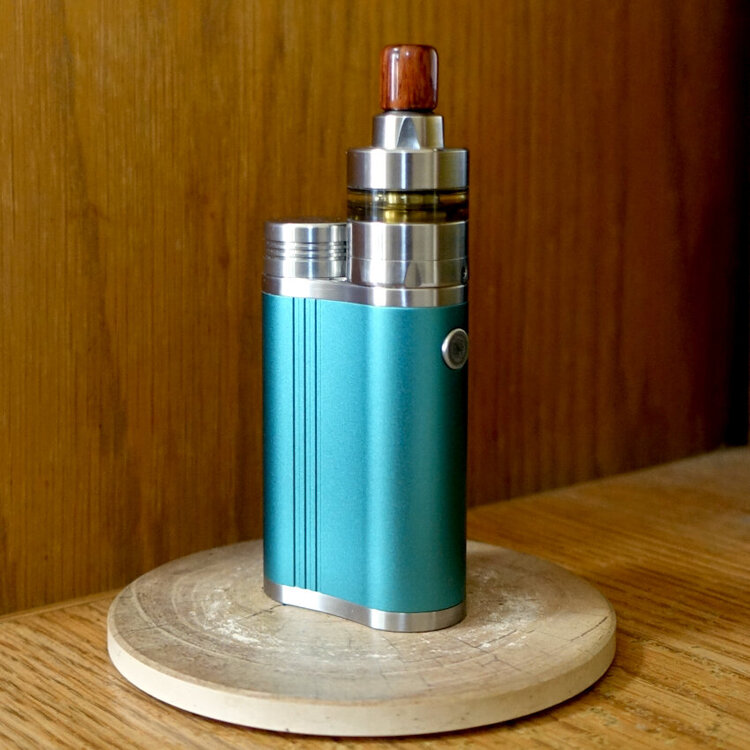
Just this week I received a Cthulhu Sentinel with a DNA 60C I'm a tootle vaping rebuilder and running a Kayfun Lite (2019) RTA The build is 30 gauge A1 Kanthal on 2mm @ 1.8ohms I vape 50/50 PG/VG 18mg nic 1.8 ohms @ 6-7 Watts Obviously the DNA 60C is overkill for my vaping style. That said, I would like to see a service pack update that allows increments of 0.2 Watts or at least 0.5 Watt increments when vaping under 10 Watts. Right now the increments in the Watt profile are set to one(1) whole Watt with each press of the +/- buttons. I'm new to eScribe and have not found any settings to change the Watt Increment behavior.